Electric Scooter Universal App
Learning, Education, Improvement Apps & CoursesAuto & Vehicles
3.042.00 Reviews
- Version
- 4.4.1
- Installs
- 100.00K
- Age Rating
- Everyone
Screenshots
Our Review of Electric Scooter Universal App
 Analysis by Appyee
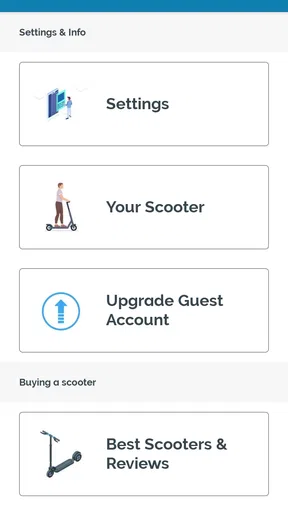
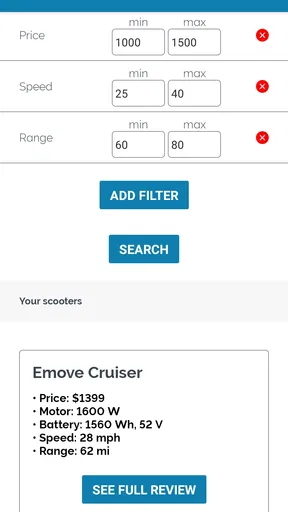
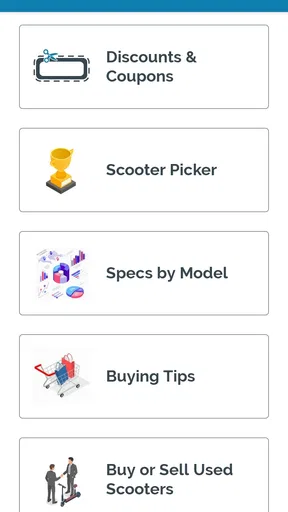
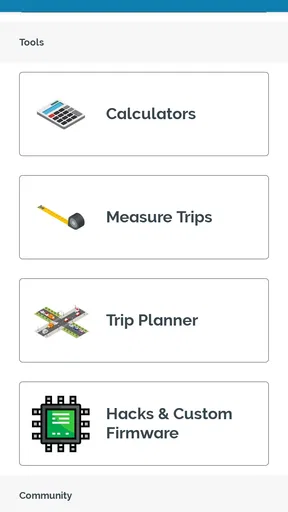
I approached Electric Scooter Universal App as a practical companion for everyday scooter ownership rather than as a full replacement for a manufacturer’s control app. Its focus is broad: it brings together scooter-related lists, advice, tools, and a place to buy or sell. That combination makes it interesting for someone who wants one general-purpose starting point, especially when researching a scooter, preparing for a ride, or trying to organize ownership tasks.
My overall impression is mixed but useful. The app can save time when I need general guidance or want to browse scooter-related buying and selling information, yet it does not remove the need to understand my own scooter’s manual, controls, battery behavior, or local riding rules. Its average rating sits at 3.0 from around 500 ratings, which matches my view that the idea is helpful but the experience may feel uneven depending on what I expect it to do.
Where the app helps, and where users can get stuck
The biggest source of confusion is the word “universal.” I would not treat that as a promise that every scooter model will connect to every tool or that the app can replace a brand-specific application. I see it more as a general hub for electric scooter owners. That distinction matters before installation: if I need firmware updates, a precise motor diagnostic, account-based locking, or model-specific battery information, I would begin with the scooter manufacturer’s own software and documentation.
For general ownership, the broader approach has value. A new rider may use the lists to remember preparation steps, browse tips before commuting, or look through buying and selling material when comparing options. An experienced owner may appreciate having general tools and reference material in one place instead of searching through unrelated web pages. The usefulness depends less on flashy automation and more on whether the information fits the task I am handling that day.
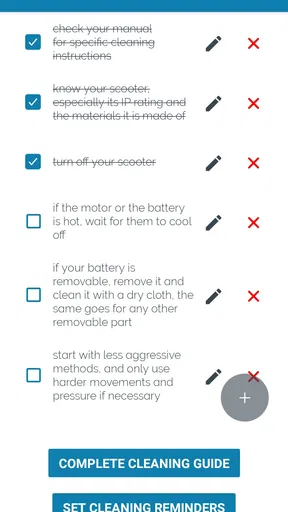
One realistic scenario is preparing for a short commute after the scooter has been unused for several days. I would use the app to review a personal checklist, think through basic safety items, and confirm that I have considered the condition of the scooter before leaving. I would still inspect the tires, brakes, lights, folding mechanism, and charging equipment myself. The app can support that routine, but it cannot physically verify the scooter.
Another practical situation is buying a used scooter. The buy-and-sell side may help me organize questions for a seller, compare listings, and avoid making a decision based only on appearance. I would ask about charging behavior, storage conditions, repairs, original accessories, and proof of ownership. I would also test the scooter in person where it is safe and legal. A general app is useful here as a reminder system, not as a substitute for inspection.
The app is less suitable for someone who wants a polished, model-specific dashboard. If my main goal is live ride data, exact range estimates, navigation, remote security, or technical error reporting, I would look first at the official app for my scooter. Those tools usually have a clearer relationship with the hardware they control. This app makes more sense when my needs are spread across advice, preparation, tools, and marketplace browsing.
Why the first screen may not answer the important question
When I open a general scooter app, I naturally want to know what it can do with my particular scooter. That is where expectations can get ahead of reality. Before spending time inside every section, I would identify my actual goal: learning basic ownership habits, preparing a checklist, finding a tool, or researching a purchase. Starting with one task prevents the app from feeling like a collection of loosely related material.
A useful habit is to keep the scooter’s exact model name nearby while exploring. Even if the app presents universal guidance, model differences still matter. A recommendation that is sensible for one scooter may not apply to another with different tires, brakes, charging hardware, or folding design. I would use the app for general direction and then verify model-specific instructions against the manufacturer’s manual.
The marketplace aspect can also create friction because buying and selling requires judgment outside the app. A listing may look attractive while hiding expensive wear or missing equipment. I would treat any listing as a starting point for questions rather than proof of condition. This is one of the app’s less obvious trade-offs: bringing shopping and ownership advice together is convenient, but it can encourage quick decisions if I do not slow down and verify the details.
Setup checks that make the experience more useful
Electric Scooter Universal App is free, has an Everyone content rating, and runs on Android devices using version 7.0 or later. That makes it approachable for many scooter owners, including people using an older phone. I would still make sure the phone has enough free storage, a stable connection during installation, and the latest available app build. The current version is 4.4.1, so updating before troubleshooting is a sensible first step.
Because this is an app for a physical vehicle, I would separate phone setup from scooter setup. Installing the app does not automatically mean that the scooter is ready to use, charged, safe, or compatible with every function I may want. I would first confirm that the phone itself is working normally, then open the app and test one simple section before attempting a longer workflow.
My preferred setup sequence would be straightforward:
Install the app on a supported Android device and open it once the installation finishes.
Choose one purpose, such as reviewing tips, using a tool, or browsing buying and selling information.
Keep the scooter model and its manual available for comparison.
Write down any useful checklist items instead of assuming the app will replace my own maintenance routine.
Close and reopen the app after an update if a section behaves inconsistently.
This approach avoids a common mistake: trying to judge the whole app before deciding what I need from it. A general-purpose product can feel unfocused when I browse randomly, but it becomes easier to evaluate when I give it a specific job. I also avoid making safety decisions while riding. Any checklist or advice should be reviewed while stopped, with the scooter parked securely.
For users who are moving from iOS, the platform detail deserves attention. The app is described as an Android application, and its stated minimum operating system is Android 7.0. I would therefore confirm platform availability before planning to use it on an iPhone. If I rely on iOS exclusively, an official manufacturer app or a browser-based reference may be a better fit for my routine.
The developer is listed as Learning, Education, Improvement Apps & Courses. That description fits the app’s educational and practical angle more closely than a dedicated vehicle-control utility. I would approach it as a learning and ownership aid, not as a professional diagnostic instrument. That expectation makes the strengths easier to see and the limitations less surprising.
Small checks that prevent misleading results
If a tool appears to give an unexpected result, I would first check whether I entered the right scooter details or interpreted the result too literally. General tools often depend on the quality of the information supplied by the user. I would compare the result with the scooter’s manual and with what I can observe directly, especially for battery, tire, braking, or range-related decisions.
I would also avoid testing several things at once. For example, if I am checking a preparation list while changing scooter settings in another application, it becomes difficult to know which product is responsible for a problem. A cleaner method is to use this app for its general guidance, then use the official scooter software separately for model-specific functions. This simple separation is one of the most useful workflow improvements I found.
For marketplace use, I would capture the important details in my own notes: seller claims, visible wear, included charger, service history, and questions still needing answers. That protects me from losing context while moving between listings. It also turns the app’s broad buying-and-selling role into a more disciplined decision process rather than casual browsing.
Recovering when a workflow stops making sense
When a section does not load or a tool behaves unexpectedly, I would begin with ordinary recovery steps rather than assuming the scooter is faulty. I would check the internet connection, close and reopen the app, restart the phone, and confirm that the installed version is current. If the problem appears only in one area, I would leave that section and test another simple part of the app. This helps distinguish a local loading issue from a broader phone problem.
If the app loses my place in a checklist or browsing session, I would recreate the last step slowly and record what I was trying to do. The useful detail is not simply that “it failed,” but whether the issue happened while opening a page, entering information, switching sections, or returning from another screen. That information makes later troubleshooting more focused.
I would not repeatedly tap controls while the scooter is moving, and I would not use a confusing result as a reason to continue riding. Park first, inspect the physical scooter, and only then return to the app. A phone screen can show guidance, but it cannot confirm that a brake cable is secure, a tire is properly inflated, or a folding latch is locked.
One advanced but practical workflow is to use the app before and after a maintenance task. Before working on the scooter, I would note the condition and the question I am trying to answer. Afterward, I would repeat the relevant checklist and compare the physical result. This creates a simple before-and-after record without pretending that a general app has performed a professional inspection.
Another useful trade-off concerns convenience versus accuracy. The app’s broad material may be faster to consult than a long manual, especially when I need a reminder before leaving home. However, the manual remains the better authority for model-specific limits and procedures. I would use the app for orientation and the manual for decisions involving hardware, charging, or safety-critical parts.
When a problem is probably not caused by the app
It is easy to blame the phone when a scooter will not start, charges slowly, loses power, or feels unstable. In many cases, those are physical, electrical, or model-specific issues. I would inspect the charger and visible connections, check whether the scooter’s own display shows an error, and consult the manufacturer’s instructions. I would stop using the scooter if braking, steering, structural parts, or battery behavior seems unsafe.
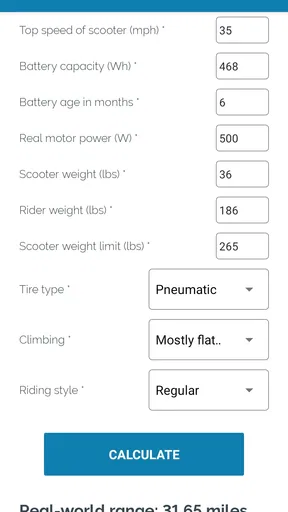
The same separation applies to range complaints. A general tool may help me think about usage, but real range changes with rider weight, terrain, temperature, speed, tire condition, battery age, and riding style. If the scooter performs differently from its normal behavior, I would record the circumstances and seek model-specific guidance rather than treating a general estimate as a diagnosis.
Connection problems also need careful interpretation. If an official scooter application cannot find the vehicle, that may involve Bluetooth settings, pairing state, phone compatibility, or the scooter itself. Installing a universal helper app will not necessarily repair that relationship. I would follow the official pairing procedure and avoid repeatedly resetting things without noting what changed.
For a used scooter, software cannot settle questions about ownership, hidden damage, battery health, or stolen property. I would verify the seller and paperwork where appropriate, inspect the vehicle, and use a safe meeting arrangement. The app can help me remember questions and compare options, but responsibility for the purchase remains with me.
Who should use it and who should choose another option
I think the app is best for new owners who want a broad introduction to electric scooter care and for existing owners who like having checklists, tips, tools, and marketplace material in one place. It may also suit someone researching a first purchase and trying to understand the practical questions that sellers and buyers should discuss.
It is a weaker choice for riders who already depend on a manufacturer’s app for every important task. If I need precise vehicle telemetry, firmware management, remote locking, or a live ride dashboard, I would prefer the official solution when one is available. A dedicated maintenance resource may also be better if my goal is detailed repair instruction rather than general ownership guidance.
The rating of 3.0 suggests that I should approach the app with realistic expectations rather than assuming it will work perfectly for every scooter and every phone. Its audience size is meaningful, with over 100 thousand installs, but popularity alone does not prove that its tools match my model. I would try it because it is free, then keep only the sections that genuinely improve my routine.
The age rating of Everyone is reassuring for households where younger users may encounter the app, but it should not be confused with permission to ride without supervision or training. Electric scooters involve real traffic and mechanical risks. I would use the app as an educational aid and make sure riding decisions follow local rules and sensible safety practices.
One reason I would recommend trying it before dismissing it is its combination of subjects. Most alternatives force me to choose between a manufacturer dashboard, a repair guide, a shopping platform, or a general checklist. This app attempts to sit between those categories. That makes it less specialized than each alternative, but potentially more convenient for early-stage ownership and everyday preparation.
My practical verdict after using it as an ownership companion
Electric Scooter Universal App is a useful general helper when I want guidance, lists, tools, or a place to explore scooter buying and selling. Its free access and broad Android compatibility make it easy to test, and its educational focus gives new owners a reasonable starting point. I especially like the idea of using it to structure pre-ride checks and to turn used-scooter shopping into a more careful question-and-inspection process.
At the same time, I would not make it the only app in my scooter setup. It is not the right substitute for model-specific software, a manufacturer manual, a physical inspection, or qualified repair help. The most dependable arrangement is a layered one: use this app for general preparation and ownership habits, use official resources for the scooter’s exact hardware, and use your own judgment whenever safety or money is involved.
My recommendation is therefore conditional but positive. If you are new to electric scooters or want a broad reference point, it is worth trying. Start with one concrete task, verify model-specific advice, and keep notes for buying or maintenance decisions. If you expect a sophisticated connected dashboard or guaranteed compatibility with every scooter, choose a dedicated alternative instead. Used thoughtfully, this app can make ownership more organized; used as a diagnostic authority, it may leave important gaps.
Verdict
Strengths of Electric Scooter Universal App
- Works with many scooter brands in one convenient app.
- Shows battery level and ride details in an easy-to-read layout.
- Helps locate nearby scooters and available parking areas.
- Useful for comparing local scooter services before starting a ride.
- Quick access to account, payment, and rental information.
Limitations of Electric Scooter Universal App
- Compatibility and features may vary between scooter providers.
- Location data can be inaccurate in crowded or built-up areas.
- Some scooters may not appear until their provider is supported.
- Requires location, Bluetooth, and internet access for full functionality.
- Availability, prices, and parking rules depend on the local service.
Similar Picks in This Category
View All
Android Auto
Google LLC4.1

maxim — order a taxi & food
PT. SITO4.7

Штрафы ГИБДД: проверка с фото
Pays LLC – Штрафы ГИБДД4.7

Номерограм – проверка авто
Авто Ассист4.8

Дром Авто
Дром4.9

Frequently Asked Questions
What is the Electric Scooter Universal App used for?
The Electric Scooter Universal App is designed to help riders manage and monitor compatible electric scooters from one place. Depending on the scooter model and available support, it may provide access to battery information, riding statistics, speed settings, vehicle status, location features, trip history, and basic controls. Its usefulness depends heavily on whether your scooter brand and model are supported.
Is the app compatible with every electric scooter?
Despite its universal name, the app may not work with every electric scooter on the market. Compatibility generally depends on the scooter’s manufacturer, communication protocol, Bluetooth connection, and firmware. Before downloading, check the supported-device list and user feedback, then confirm that your exact model appears. Some features may also be unavailable even when basic pairing works.
How do I connect my scooter to the Electric Scooter Universal App?
To connect a scooter, install the app, enable Bluetooth and location permissions when requested, and keep the scooter powered on and nearby. Open the device section, search for available scooters, and select your model. Some scooters require a confirmation button or pairing code. If connection fails, restart Bluetooth, close other scooter apps, and verify that the vehicle is not already connected elsewhere.
Does the app require an internet connection or an account?
The requirements can vary by feature and device. Bluetooth-based functions, such as viewing certain scooter details or adjusting supported settings, may work without continuous mobile data. However, account registration, cloud synchronization, maps, firmware updates, remote tracking, and trip backups may require internet access. Review the permission and privacy screens carefully before creating an account or enabling location services.
Is it safe to change scooter settings through the app?
Changing settings can be useful, but riders should proceed carefully because options may affect speed, acceleration, braking behavior, or battery consumption. Only adjust controls you fully understand, and follow local regulations and the scooter manufacturer’s recommendations. Avoid modifying firmware or safety-related settings unnecessarily. Test any change in a controlled area, wear appropriate protective equipment, and never adjust settings while riding.
